This articel i explain how to configuration mikrotik using pc for router.
1. Configuration position of ADSL connection
modem —Mikrotik—-Switch —– Client
|
Client
a. Modem IP –>> 192.168.1.1
b. Mikrotik Using 2 Interface - Ether1 —->> 192.168.1.2
- Ether1 —->> 192.168.0.254
c. Switch — Client ip 192.168.0.1-253
2. Configuration step router pc mikrotik
a. add ip address to interface 1
/ip address add interface=ether1 address = 192.168.1.1 netmask= 255.255.255.0
b. add ip address to interface2
/ip address add interface=ether2 address = 192.168.0.1 netmask= 255.255.255.0
c. to see input of interface
/interface print
d. Set Value name off interface
/inteface set 0 name=”Public” –>> For Modem
/inteface set 1 name=”Lan” –>> For Lan
e. set routing for net ( modem )
/ip route add gateway=192.168.0.1
f. set dns server ISP
/ip dns set primary-dns=203.130.193.74 secondary-dns=202.134.0.155
/ip dns set allow-remote-requests=yes
g. set of nat the router pc to sharing bw to lan
/ip firewall nat add chain=srcnat out-inteface=Public action=masquerade


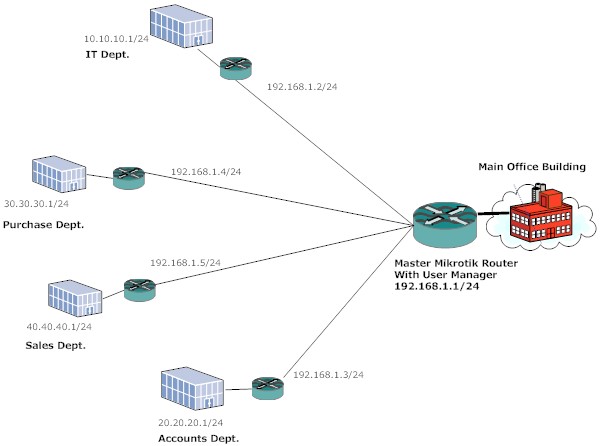
Generally we are using external Radius servers for user authentication as MikroTik is not Radius server. But here in this example we use the MikroTik User Manager which works as a Radius server and does authentication and control of your Hotspot users.
Requirements
Central location: MikroTik OS with User Manager (suggested License is L6).
Hotspot: Mikrotik Routerboard with at least a L4 License
Network 192.168.1.0/24
R1-Hotspot Master
WAN IP-
LAN IP – 192.168.1.1/24

R2-Hotspot IT Dept
WAN IP – 192.168.1.2/24
LAN IP – 10.10.10.1/24

R3-Hotspot Account Dept.
WAN IP – 192.168.1.3/24
LAN IP – 20.20.20.1/24

R4- Hotspot Purchase Dept
WAN IP – 192.168.1.4/24
LAN IP – 30.30.30.1/24

R5- Hotspot Sales Dept.
WAN IP – 192.168.1.5/24
LAN IP – 40.40.40.1/24
We assume that all the setup is ready and the hotspot is configured on R2, R3, R4, and R5 with local authentication.
First, we will configure R2, R3, R4 & R5 to use MikroTik user manager as a Radius server.
/ip hotspot profile
use-radius=yes


/radius add
service=hotspot address=192.168.1.1 secret=123456

This configuration will apply to all the Hotspot router.
Now, we will configure R1-Hotspot Master.
/tool user-manager customer add
subscriber=mikrotik login="mikrotik" password="ashish" time-zone=+05:30
permissions=owner parent=mikrotik

/tool user-manager router add
subscriber=mikrotik name="R2" ip-address=192.168.1.2 shared-secret="123456"

subscriber=mikrotik name="R3" ip-address=192.168.1.3 shared-secret="123456"

subscriber=mikrotik name="R4" ip-address=192.168.1.4 shared-secret="123456"

subscriber=mikrotik name="R5" ip-address=192.168.1.5 shared-secret="123456"
and finally add the user on R1
/tool user-manager user add
username=ashish password=ashishpatel subscriber=mikrotik
The user name and password will work for all the remote hotspot router…a user can login from any department of the company with same ID and password and we can have all the user data centrally.
Now you can log into the User Manager web interface on the address http://192.168.1.1/userman and start setting up your user accounts.
More information in the User Manager section.
HotSpot configuration
/ radius add service=hotspot address=127.0.0.1 secret=123456
We add radius client to consult User Manager server for appropriate service. 'address=127.0.0.1' points RADIUS client to use local router as RADIUS server, 'secret' is shared secret to exchange information between RADIUS server and client.
/ ip hotspot profile set hsprof1 use-radius=yes
To use RADIUS for HotSpot AAA.
User Manager configuration
- First we need to create subscriber.
/ tool user-manager customer add login="MikroTik" password="qwerty" permissions=owner
- Then add router information to the User Manager configuration,
/ tool user-manager router add subscriber=MikroTik ip-address=127.0.0.1 shared-secret=123456
'ip-address' is the address of the RADIUS client router.
Note, 'shared-secret' should match on User Manager and RADIUS client.
This script create rule mangle and Queue Three at Mikrotik
##### Script Mangle ##################
:for e from 2 to 11 do={
/ip firewall mangle add chain=prerouting src-address=(192.168.224. . $e) action=mark-connection new-connection-mark=($e . indosatcon )
/ip firewall mangle add chain=prerouting connection-mark=($e . indosatcon ) action=mark-packet new-packet-mark=($e . indosatflow ) passthrough=no
}
################################
##### Scrip Queeus #################
:for e from 2 to 11 do={
/queue tree add name=(”STREAM-DOWN-” . $e) parent=STREAM-DOWN packet-mark=($e . indosatflow)
/queue tree add name=(”STREAM-UP-” . $e) parent=STREAM-UP packet-mark=($e . indosatflow)
}
###############################